
| Category | Rating |
|---|---|
| Ease of Use | 4.8/5 |
| Features | 4.7/5 |
| Backup Reliability | 4.8/5 |
| Value for Money | 4.6/5 |
| Customer Support | 4.4/5 |
| Overall Score | 4.6/5 |
Data loss rarely happens at a convenient time. A failed SSD, a corrupted Windows update, ransomware, or accidental deletion can leave users scrambling to recover critical data. AOMEI Backupper aims to eliminate that risk by providing a complete data backup and disaster recovery platform for Windows PCs.
Designed for both home users and small businesses, AOMEI Backupper combines system imaging, disk cloning, automated backups, and disaster recovery tools in a single interface. Unlike enterprise-focused backup and disaster recovery solutions that often require significant technical expertise, AOMEI prioritizes usability while still offering advanced functionality.
What Is AOMEI Backupper?
AOMEI Backupper is a Windows backup software designed to protect operating systems, files, partitions, and entire disks. In addition to image-based backups, it serves as a comprehensive backup utility for both home and business environments.
Rather than simply copying files and folders, the software creates image-based backups that can restore an entire machine—including Windows, installed applications, settings, and personal data—to a previous state.
Besides backup capabilities, AOMEI also serves as reliable recovery software, helping users recover quickly during system failures.
The software is available in both free and premium editions, making it suitable as software for personal use and software for business use.
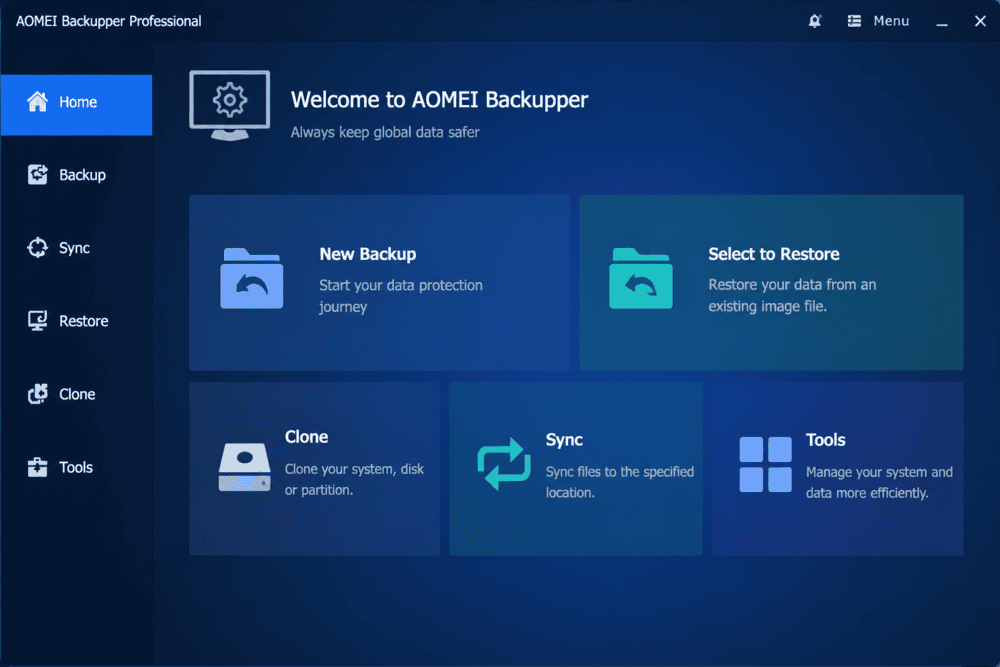
Key Features of AOMEI Backupper
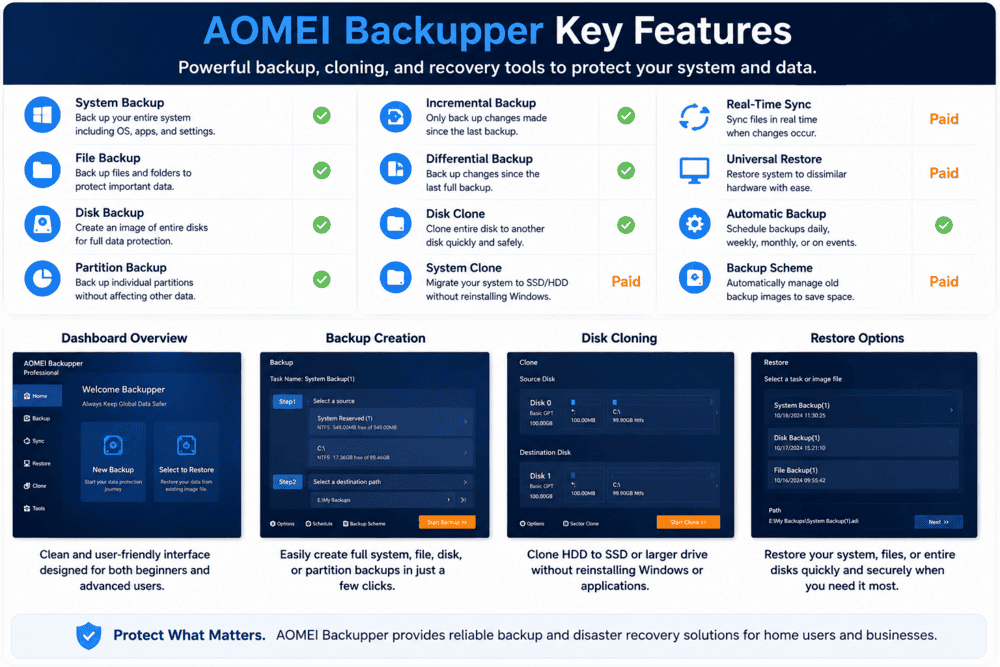
AOMEI Backupper includes a wide range of backup, cloning, and recovery tools designed to protect both personal and business data. Below are some of the most important features that distinguish the software from many competing solutions.
Full System Imaging
System Backup is one of AOMEI Backupper’s strongest capabilities. The software creates a complete image of the Windows system, allowing users to restore a computer after hardware failure, system corruption, or unsuccessful updates.
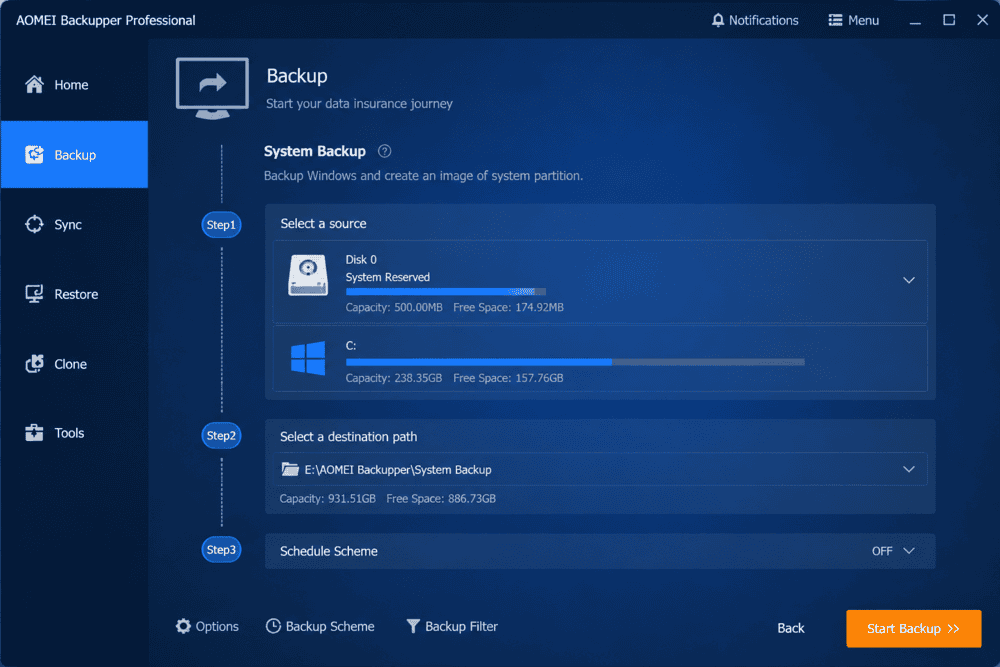
For users who regularly install new software, modify system settings, or test applications, creating a system image before major changes can significantly reduce downtime.
Incremental and Differential Backups
AOMEI supports both incremental and differential backup methods.
Incremental backups record only changes made since the previous backup, minimizing storage consumption and reducing backup times.
Differential backups store all changes since the last full backup, simplifying recovery because fewer backup files are required during restoration.
The availability of both methods gives users flexibility to optimize either storage efficiency or recovery speed.
Disk Cloning and OS Migration
AOMEI Backupper is particularly popular among users upgrading from HDDs to SSDs.
Its cloning engine functions as advanced clone software and can migrate Windows, installed programs, and user files to a new drive without reinstalling the operating system.
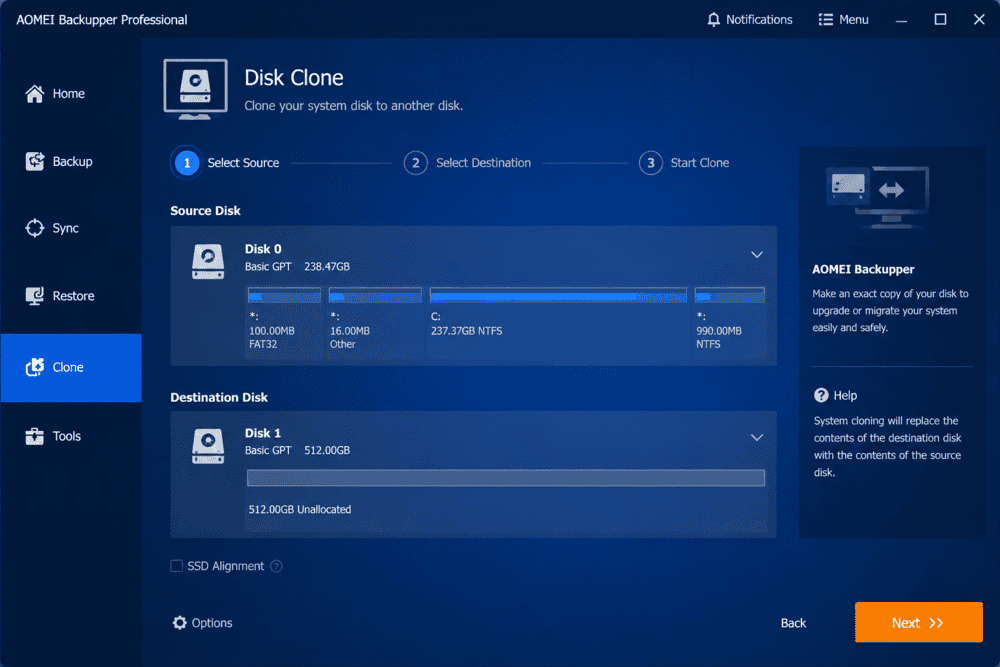
For many users, this feature alone justifies upgrading to the Professional edition.
Automated Backup Scheduling
Backups can be scheduled to run daily, weekly, monthly, or when specific events occur, such as user logon or system startup.
Automated scheduling removes the need for manual intervention and ensures that recovery points remain current.
Combined with incremental backups, automation allows users to maintain frequent restore points without consuming excessive storage space while simplifying every backup task.
Real-World Use Cases
AOMEI Backupper can be used in a variety of scenarios, from personal data protection to business continuity planning. The following examples illustrate where the software provides the greatest value.
Recovering from Ransomware
Offline backup images remain one of the most effective defenses against ransomware. If encrypted files cannot be recovered, users can restore a clean image and resume operations quickly using reliable backup and restore capabilities.
Migrating to a New SSD
Users replacing an aging hard drive can transfer their existing Windows installation directly to a faster SSD, avoiding hours of reinstalling applications and reconfiguring settings.
Business Continuity for Small Teams
Small businesses often lack dedicated IT infrastructure. By scheduling backups to NAS devices or network locations, teams can protect critical business data while minimizing operational disruptions. Business editions also include dedicated versions for Windows Server environments.
Pros and Cons
Like any backup software, AOMEI Backupper has strengths and limitations. Understanding both sides helps determine whether it is the right solution for your needs.
Pros
- Intuitive and easy-to-use interface suitable for non-technical users.
- Supports full system imaging, cloning, synchronization, and file backups.
- Reliable SSD migration tools.
- AOMEI Backupper is widely recognized as one of the best free backup software solutions available for Windows users.
- Supports NAS, external drives, and network storage.
Cons
- Several advanced features require a paid license.
- Interface design feels dated compared to some competitors.
- No native cloud storage service is included.
AOMEI Backupper Pricing
AOMEI offers several licensing options designed for home users, professionals, and businesses. Understanding the available plans can help you choose the edition that best matches your backup needs.
Users requiring Universal Restore, advanced backup schemes, system deployment, or business-oriented functionality must upgrade to one of the paid editions, including Professional, Workstation, Server, or Technician licenses.
AOMEI offers editions tailored for both Windows PC and Server environments, allowing individuals and businesses to choose the version that best fits their needs.
Users can also download AOMEI Backupper Standard or request a free trial before upgrading.
Ready to protect your files and system? Try AOMEI Backupper today and explore its free and premium features.
AOMEI Backupper Standard vs Professional
Choosing between the Standard and Professional editions depends largely on your backup requirements. While the free version covers essential tasks, advanced users may benefit from the additional features included in the paid edition.
One of the biggest questions potential users have is whether the free version is sufficient or if upgrading to the Professional edition is worth the investment.
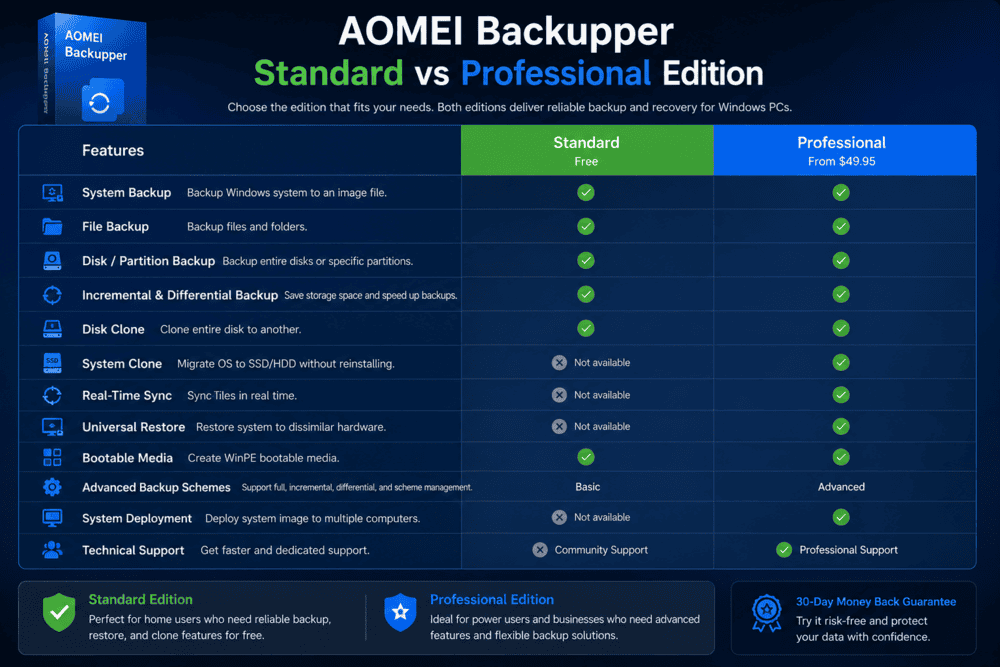
The free Standard edition covers the essential backup needs of most home users. It includes system backup, file backup, disk imaging, synchronization, scheduled backups, and basic disk cloning capabilities.
The AOMEI Backupper Professional edition unlocks several premium capabilities, including:
- System Clone for migrating Windows to a new drive.
- Universal Restore for restoring backups to different hardware.
- Real-Time Sync for continuous file sync operations.
- Event-triggered backups.
- Automatic backup cleanup schemes.
- Advanced backup options and enhanced cloning features.
For users simply looking to protect personal files and create occasional system images, the free edition is often sufficient.
On the other hand, users upgrading hardware, managing multiple PCs, or requiring business continuity capabilities will likely benefit from upgrading to the Professional version.
Overall, AOMEI Backupper Standard is one of the most generous free backup solutions available, while the Professional edition adds features that can save significant time during hardware upgrades and disaster recovery scenarios.
Need advanced features like Universal Restore and System Clone? Upgrade to AOMEI Backupper Professional today and simplify your backup and recovery workflow.
AOMEI Backupper vs Macrium Reflect
Macrium Reflect is one of AOMEI Backupper’s main competitors. Comparing both products helps users identify which solution better fits their technical requirements and budget.
AOMEI Backupper and Macrium Reflect are two of the most popular backup solutions for Windows, but they target slightly different audiences.
AOMEI Backupper focuses primarily on simplicity and affordability. Its clean interface, straightforward backup wizard, and flexible cloning tools make it particularly appealing for home users and small businesses.
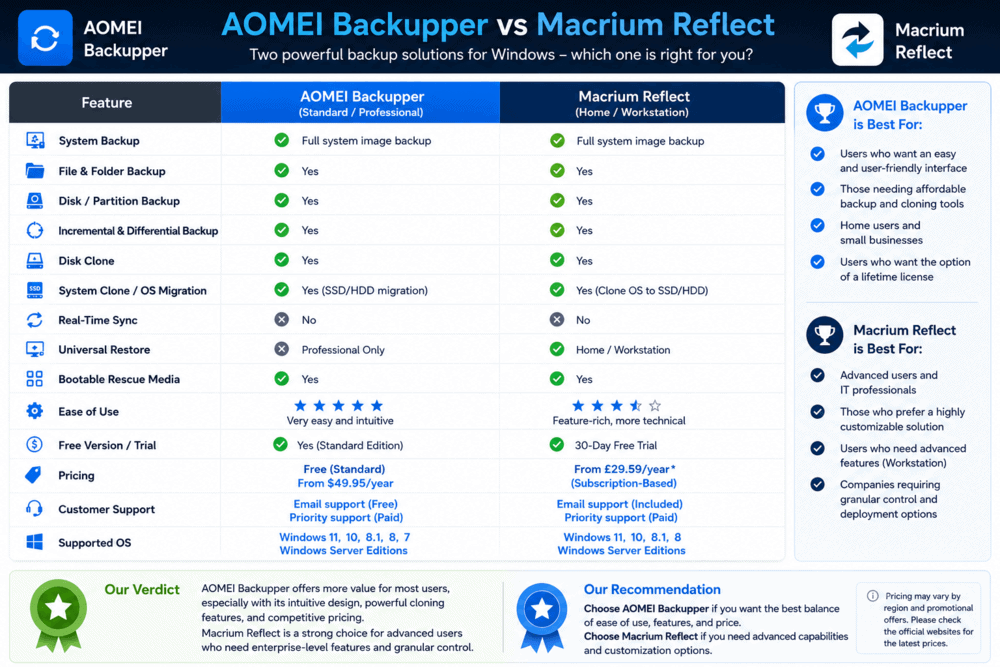
Macrium Reflect, in contrast, has traditionally been favored by IT professionals and advanced users because of its highly configurable imaging engine and extensive recovery options.
When comparing the two solutions, several differences stand out:
| Feature | AOMEI | Macrium |
|---|---|---|
| Ease of Use | Excellent | Very Good |
| Free Version | Yes | Limited |
| Pricing | More affordable | More expensive |
| Best For | Home Users & SMBs | Advanced Users & IT Pros |
For most home users and small businesses, AOMEI Backupper offers a better balance between usability, features, and affordability.
Users who require advanced imaging customization, extensive scripting capabilities, or enterprise-grade deployment tools may prefer Macrium Reflect.
Ultimately, both products are reliable, but AOMEI Backupper provides better overall value for most home users and small businesses seeking an easy-to-use backup solution at a competitive price.
Is AOMEI Backupper Safe?
Yes. AOMEI Backupper is developed by AOMEI Tech, a well-established software company with millions of users worldwide. The software is widely used for backup, cloning, and recovery tasks and is generally considered safe when downloaded from the official website.
As with any software, users should avoid downloading installers from unofficial sources to minimize security risks and ensure they receive the latest updates and security patches.
Is AOMEI Backupper the Right Backup Solution?
For most Windows users, the answer is yes.
AOMEI Backupper delivers a strong combination of reliability, ease of use, and advanced backup features at a competitive price point.
Its disk cloning functionality, flexible scheduling options, and image-based recovery system make it particularly attractive for users seeking dependable data backup and recovery.
Frequently Asked Questions
Is AOMEI Backupper free?
Yes. AOMEI Backupper Standard is available free of charge and includes essential backup, restore, synchronization, and cloning features.
Is AOMEI Backupper safe?
Yes. AOMEI Backupper is considered safe when downloaded directly from the official AOMEI website.
Can AOMEI Backupper clone an SSD?
Yes. AOMEI Backupper supports SSD cloning and includes SSD Alignment technology to optimize performance after migration.
Does AOMEI Backupper support Windows 11?
Yes. AOMEI Backupper supports Windows 11, Windows 10, Windows 8, Windows 7, and Windows Server editions.
What is the difference between AOMEI Backupper Standard and Professional?
The Standard edition offers core backup and cloning features, while the Professional edition adds advanced capabilities such as Universal Restore, System Clone, Real-Time Sync, and automatic backup cleanup schemes.
Final Verdict
After evaluating its features, pricing, and usability, AOMEI Backupper proves to be a strong option for users seeking dependable backup and recovery capabilities.
AOMEI Backupper is one of the most complete Windows backup software solutions available. Its ability to combine system imaging, automated backups, SSD migration, and disaster recovery within a user-friendly interface makes it a compelling choice for users who need dependable protection.
Whether you need to protect a single Windows PC or multiple PCs and servers, AOMEI Backupper remains an excellent backup solution for your system, providing reliable protection for both personal and business environments.
Rating: 4.6/5
Ready to secure your files and protect your system? Download AOMEI Backupper today and start your free trial.